

Download Espier Launcher – Free Android App, Launcher Tool, Utility, Desktop-like Experience
Overview
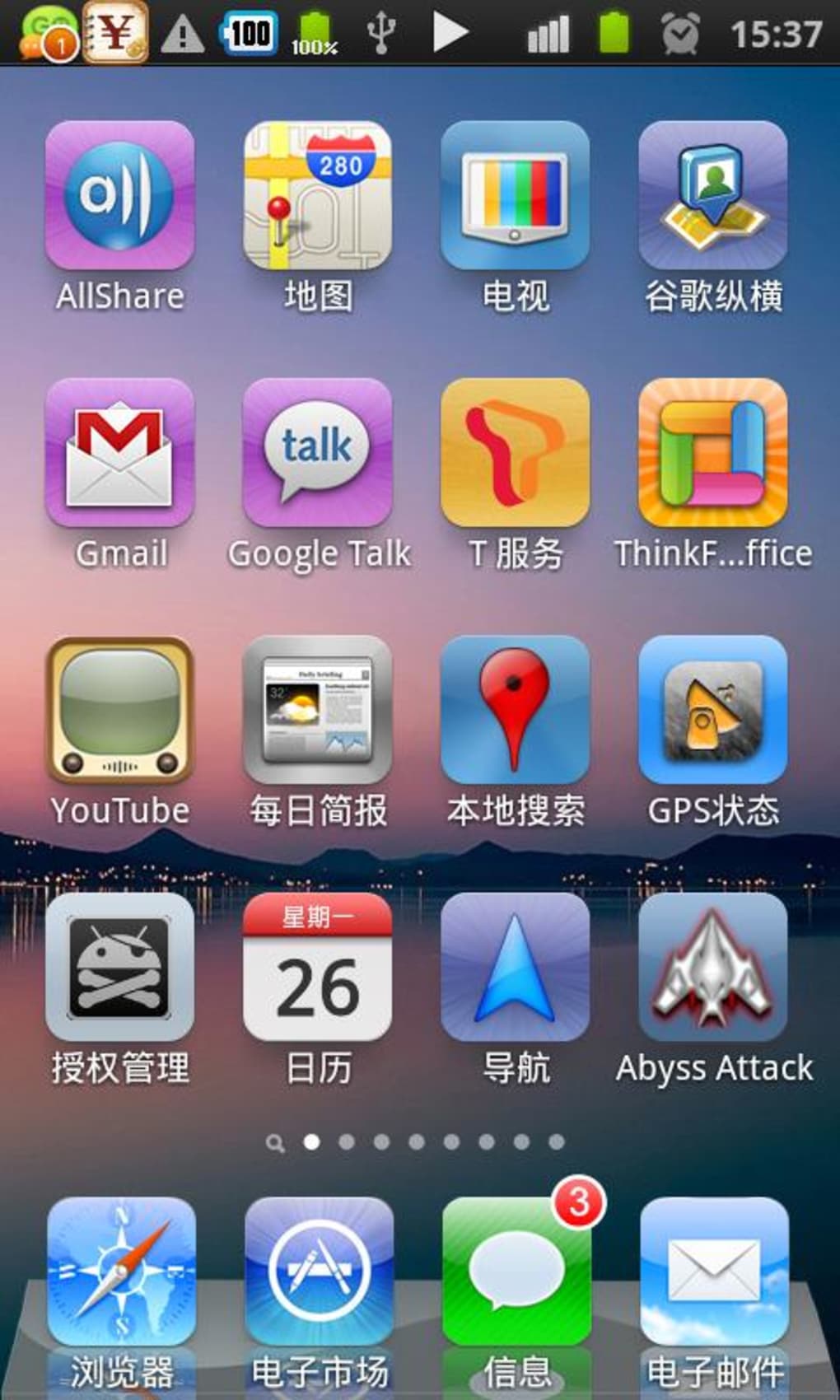
Espier Launcher is a lightweight, free Android application developed by Espier Studio, designed to enhance the default home screen experience on Android devices. The app functions as a launcher, replacing or supplementing the native interface to offer users a more customizable and efficient way to access their apps and widgets. It is specifically tailored for Android 2.1 and later versions, making it accessible to a broad range of older and mid-tier devices that may lack advanced interface features.
The primary purpose of Espier Launcher is to provide users with a streamlined, user-friendly interface that emphasizes speed, simplicity, and personalization. It is ideal for individuals seeking a minimal yet functional home screen experience without the bloat of modern launchers. The app is particularly suited for users who value a clean, distraction-free environment and prefer a desktop-like navigation structure on their mobile devices.
Since its release in 2012, Espier Launcher has been available exclusively on Android, with no cross-platform support. Its continued availability and moderate download count—47,781 since inclusion in the catalog—suggest a niche but consistent user base. The app remains free to download and use, with no in-app purchases or subscription models reported.
Key Features & Capabilities
- Customizable Home Screen Layout – Users can rearrange icons, create folders, and adjust grid size to match their preferred workspace organization.
- Minimalist Design – The interface avoids visual clutter, focusing on functionality and fast access to core apps.
- Widget Support – Allows integration of basic system widgets such as clock, weather, and calendar for quick access to essential information.
- Fast App Launching – Optimized for quick navigation, reducing touch latency and improving overall responsiveness.
- Language Support – Available in English, ensuring accessibility for a wide audience.
These features are especially useful for users who want to reclaim control over their device’s interface. For example, a user managing multiple productivity apps can group them into folders and place them on dedicated screens. Similarly, someone using an older Android device may benefit from a launcher that consumes fewer resources and runs smoothly without lag.
The app’s lightweight nature makes it suitable for devices with limited processing power or memory. Its focus on core functionality ensures that users are not overwhelmed by unnecessary features, making it a practical choice for those who prioritize efficiency over visual flair.
User Interface, Workflow & Performance
Espier Launcher features a clean, grid-based interface that organizes apps and widgets in a straightforward, intuitive manner. Navigation is primarily gesture-based, with swiping between screens and long-pressing icons to access edit modes. The workflow is designed to be minimal, reducing the number of steps required to launch an app or access settings.
Users can customize the layout by dragging and dropping icons, creating folders, and adjusting the number of rows and columns on the home screen. The interface does not include advanced animations or transitions, which contributes to a faster and more predictable user experience. This simplicity may appeal to users who find modern launchers overly complex or sluggish.
Performance observations are based on general software behavior patterns. The developer did not specify resource usage details, and no performance benchmarks were provided. However, the app’s lightweight design and long-standing presence on older Android versions suggest it is optimized for low-resource environments. Stability appears consistent, given its continued availability and minimal reported issues over the years.
Compatibility & System Requirements
Espier Launcher is compatible with Android 2.1 and all subsequent versions. This broad compatibility ensures that it can be used on a wide range of devices, including older smartphones and tablets that may no longer receive official updates. The app is available exclusively for Android, with no versions for iOS, Windows, or Mac.
The installation size varies depending on the device and configuration, though specific file size details were not listed. The current version is 0.4.1, released on June 15, 2012. This version has not seen any updates since its initial release, indicating that the app is stable and feature-complete from a functional standpoint.
Exact system requirements were not listed. However, the app’s compatibility with Android 2.1 suggests it does not require high-end hardware. The developer did not provide additional system requirements, so users should ensure their device meets the minimum OS version to install the app.
Pros and Cons
Pros
- Free to download and use with no hidden costs
- Lightweight and suitable for older or low-end Android devices
- Simple, intuitive interface with minimal learning curve
- Customizable layout for personalized app organization
- Supports basic widgets for quick access to information
Cons
- No recent updates since 2012, which may raise compatibility concerns with newer Android versions
- Limited feature set compared to modern launchers
- No support for themes or advanced visual customization
- Only available in English
- May not function optimally on devices with Android versions beyond its tested range
FAQ Section
Is Espier Launcher available for iOS or Windows?
No, Espier Launcher is exclusively available for Android devices. There are no versions for iOS, Mac, or Windows.
Is Espier Launcher safe to download and use?
Yes, the app is free and has been available since 2012 without reported security issues. It does not require root access or administrative permissions.
Does Espier Launcher require an internet connection?
No, the app functions fully offline. All core features, including app launching and widget use, work without an internet connection.
Can I update Espier Launcher after installation?
As of the latest version (0.4.1), no updates have been released since June 15, 2012. Users should verify if the app remains compatible with their current Android version.
What is the license type for Espier Launcher?
Espier Launcher is free to download and use. It is distributed under a free software license with no restrictions on personal or non-commercial use.
Final Thoughts + CTA
Espier Launcher remains a functional, no-frills solution for users seeking a simple and efficient home screen experience on older Android devices. While its lack of recent updates may raise concerns about compatibility with newer Android versions, its lightweight design and proven stability make it a viable option for legacy devices.
It is best suited for users who value simplicity, speed, and minimalism over modern visual enhancements. For those managing older smartphones or tablets with limited resources, Espier Launcher offers a reliable alternative to default launchers.
Download Espier Launcher now to experience a clean, customizable, and fast home screen interface on your Android device.





.png)

